
A website your team can actually run.
AI-managed websites for nonprofits, charities and member organizations. We build it once. Your staff then change it by conversation, and every change is drafted, previewed, approved and revertible.
What Sites does.
Sites is a website for a not-for-profit that your own staff can update, without a developer and without waiting. We build it properly once, and then the assistant makes the changes while a person on your team stays in charge of what goes live.

See your site at a glance
The home screen shows whether your site is live, when it was last published, how many people visited and what they read. Below that are the pages people visit most, the latest changes to the site, and anything waiting for approval.
Six steps, and nothing goes live without you.
- 01
We build it once
A bespoke site, built for your organization and reviewed by a person, to WCAG 2.2 Level AA.
- 02
You ask for changes
Tell the assistant what to change in plain words, or click the text on the page and type.
- 03
Preview the draft
Every edit saves as a draft, and you can preview it on desktop and mobile.
- 04
Approve it
If your site uses approvals, an editor submits the change and a site admin approves it.
- 05
Publish
Nothing reaches visitors until you publish. The live site updates within a minute or two.
- 06
Go back any time
Page history keeps earlier versions, so any change can be undone.
Change your site by talking to it.
Ask in plain words
Every page opens in the editor with a live preview and a chat beside it. Type what you want, such as “add a question about cancellations to the FAQ”, and the assistant makes the change as a draft. You can also click any heading, label or button on the page and type.
Attach a PDF, a Word file or an image and ask the assistant to draft a story, a news post or a page from it. It saves a draft and tells you what it used and what it left out, so you can review it before anything is published.

Your content, organized the way you think.
News
Announcements and updates, with post pages built for you.
Stories
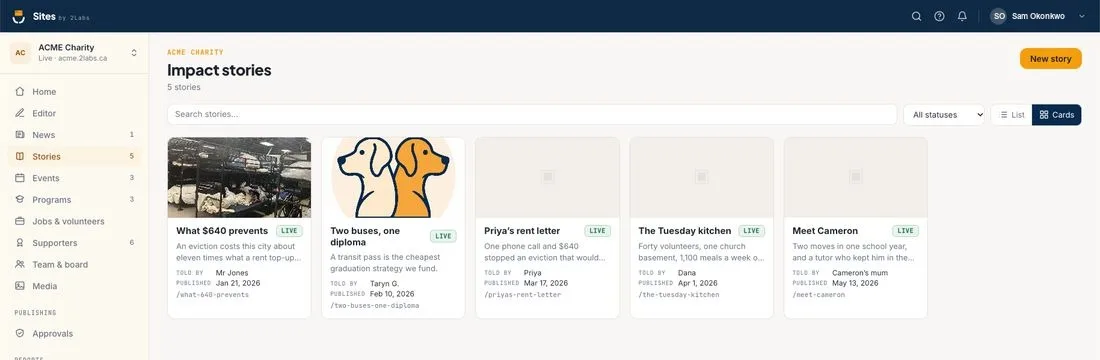
Impact stories told by the people you serve, with who told them and when.
Events
Dates, places and registration for what’s coming up.
Programs
What you run, so supporters see where the money goes.
Jobs and volunteers
Open roles and volunteer opportunities in one list.
Supporters
Donors, sponsors and partners you want to recognize.
Team and board
The people behind the organization.
Media
Photos, documents and logos, ready to reuse.
Stories that earn trust
Impact stories get their own home, with search, status and a card or list view. Each one shows who told it and when it was published, so your best proof is easy to find and reuse.
Nothing reaches visitors until you say so.
Every edit saves automatically as a draft. Publishing is a deliberate step, and for bigger teams a second person can approve each change first. Roles keep editors and administrators separate, and page history lets you step back to an earlier version.
That’s what lets a small team use AI on a public website with confidence: the assistant does the work, and a person decides what goes live.
Know what’s working.

Reports in plain English
See site traffic, top pages, where visitors come from, what devices they use and which content is active. Every figure is compared with the previous period, and a short note explains how each one is calculated.
There’s a board report too, and any report downloads as a PDF. The analytics are cookieless and privacy-first, so Sites itself needs no cookie banner.
Everyday jobs, handled.
A banner for the things that can’t wait
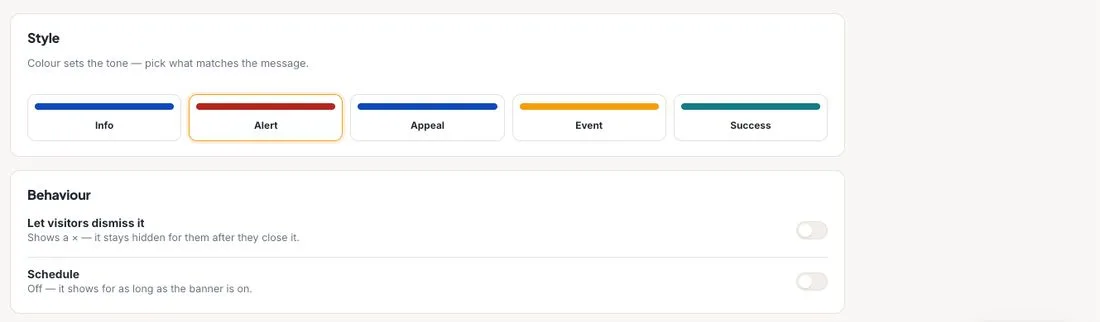
Put a message at the very top of every page for an appeal, a closure, a weather alert or an event. Pick the tone, add a link, let visitors dismiss it, and schedule it so it switches itself off.
Sites also connects to Donors and Members, so a donation form or a membership form can sit right on a page of your site.
Stuck? Just ask FRIDAY.
Ask FRIDAY is a button on every screen of your site’s studio. FRIDAY is the 2Labs help assistant. It answers from the Sites help articles, shows where each answer came from, and knows which screen you are on. If it can’t help, one click sends your question to a real person on the 2Labs team. It’s included free.
$50 a month, plus a $2,500 build.
$50 a month for a small organization, with unlimited pages and editors, plus a one-time build fee of $2,500. $150 a month for a large organization, with an SLA and accessibility reporting. All prices in Canadian dollars.
Questions about Sites
Do I need technical skills to update the site?
No. Ask the assistant for a change in plain words, or click the text on the page and type. Every change is saved as a draft you can preview before it goes live.
Can visitors see changes before I’m ready?
No. Nothing a visitor sees changes until you publish. If your site uses approvals, an editor submits a change and a site admin approves it before it goes live.
Can I undo a change?
Yes. Page history keeps earlier versions, so you can go back to one.
Can I give the assistant a document to work from?
Yes. You can attach a PDF, a Word file or an image and ask the assistant to draft a story, news post or page from it. It saves a draft for you to review, and nothing is published until you say so.
Does the site need a cookie banner?
The analytics built into Sites are cookieless and privacy-first, so Sites itself does not need one. If you add other tools that use cookies, you may still need a banner.
Does it work with Donors and Members?
Yes. You can put a Donors donation form or a Members join form straight onto a page of your site.
Is the site accessible?
Sites are built to WCAG 2.2 Level AA, then maintained by your own staff in plain language.
Is there help built in?
Yes. Ask FRIDAY, the 2Labs help assistant, is on every screen of your site’s studio. It answers from the Sites help articles, shows its sources, and passes your question to the 2Labs team when it can’t help. It’s included free and works in English only for now.
What does it cost?
$50 a month for a small organization, with unlimited pages and editors, plus a one-time build fee of $2,500. $150 a month is for a large organization, with an SLA and accessibility reporting. All prices are in Canadian dollars.
Example screens use a fictional charity.
Ready for a website you can run?
Tell us about your organization. We’ll tell you honestly what it would take.