Board meetings without the scramble.
Boards is the board portal for Canadian not-for-profits. Build the agenda, send one board pack, take the minutes and track every action, all in one place your directors will actually open.
What Boards does.
Boards runs the paperwork around a board meeting. It keeps the agenda, the board pack, the minutes, the actions and the records together, and it quietly watches the deadlines, terms and policies that slip when everyone is volunteering.
Start every day knowing what’s next
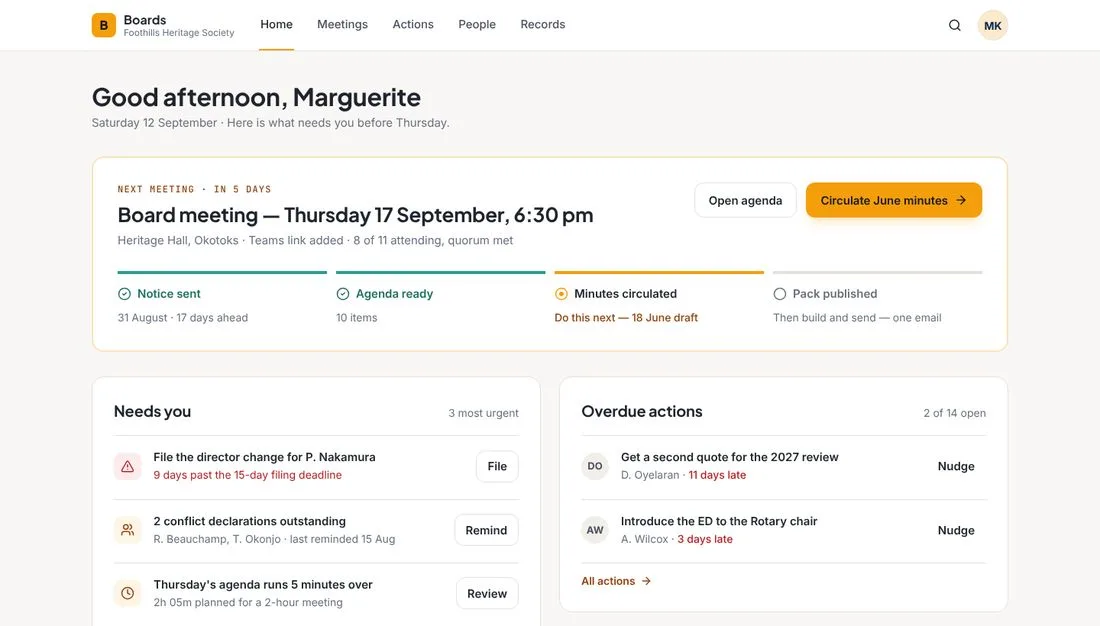
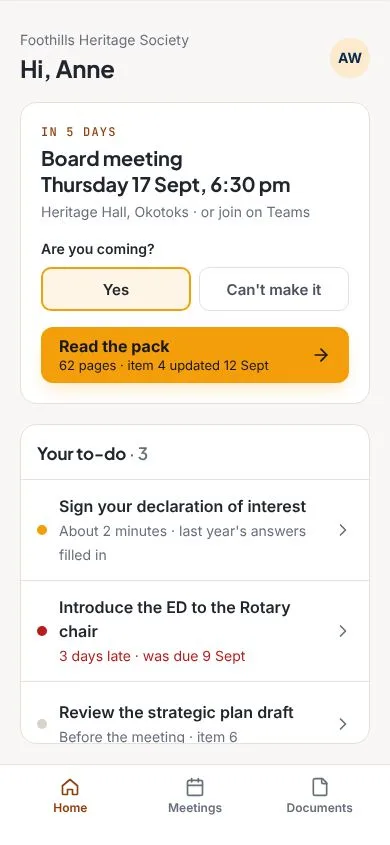
The home screen shows where the next meeting stands: notice sent, agenda ready, minutes circulated, pack published. Below it, the few things that need you most, such as a filing that is past its deadline, declarations still outstanding, or an agenda that runs over time.
Six steps, and Boards keeps each one tied to the next.
- 01
Send the notice
Set the date, place and Teams link, and track who is attending and whether you have a quorum.
- 02
Build the agenda
Drag items into order. Boards checks the timings against the length of the meeting.
- 03
Publish one board pack
One PDF with contents and page numbers. If something changes, directors get one short email saying what.
- 04
Take the minutes
Attendance fills in from the RSVPs. Record motions, who moved and seconded, and the result.
- 05
Track the actions
Actions come straight from the minutes, and Boards nudges the people who are running late.
- 06
Keep the record
Decisions, the minute book and policies are stored together. Approved records can’t be changed.
A board pack directors will open.
Build it once, and keep it current
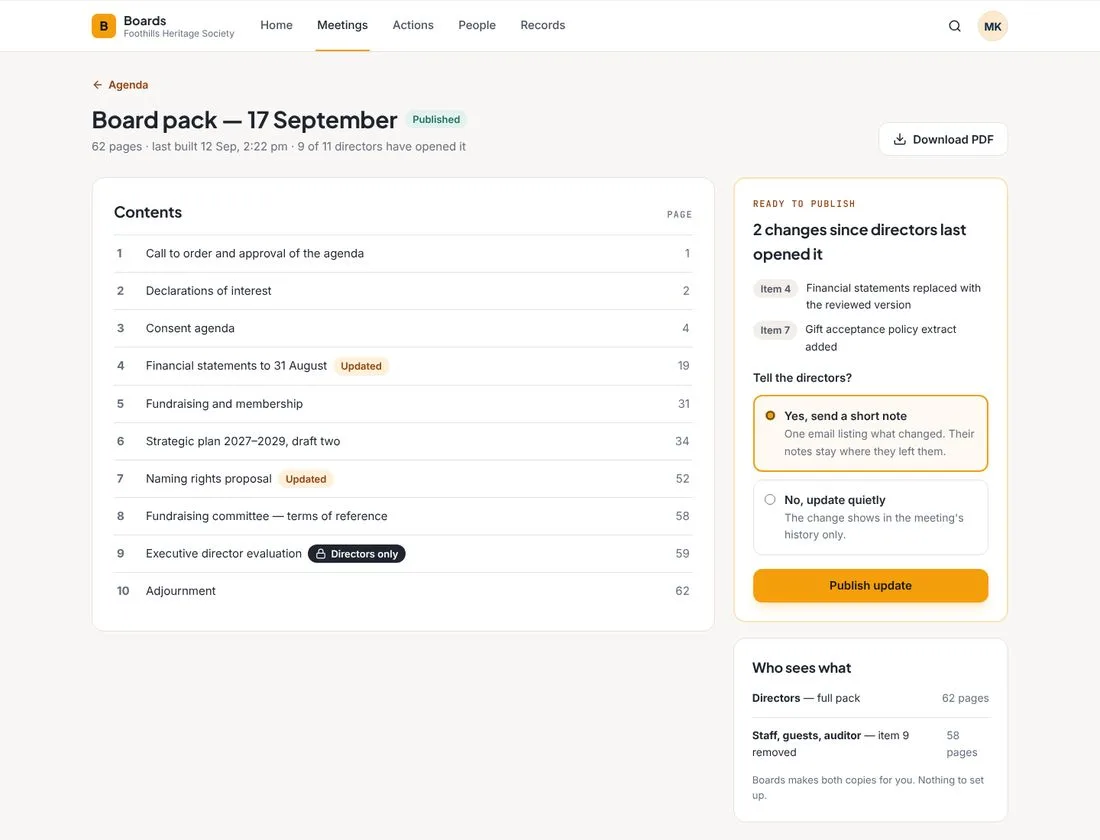
Boards turns the agenda and its documents into a single pack with contents and page numbers. When a document changes after directors have opened it, you choose whether to send one short email listing what changed, or to update quietly. Directors’ private notes stay where they left them.
Staff, guests and the auditor get their own copy, without the directors-only items. Boards makes both for you.
Everything a board needs, in one place.
An agenda that adds up
Mark each item as decide, discuss, information or consent. Boards warns you when the agenda runs longer than the meeting.
Private items stay private
Mark an item directors only. Boards makes two copies of the pack, and the staff and guest copy leaves it out.
Minutes that do the follow-up
Motions go to Records and actions go to Actions automatically. Minutes lock once the board approves them.
A director register that stays current
Terms, declarations of interest, attendance and committees, with reminders for the ones still outstanding.
The board’s year, planned
A work plan shows what belongs on each meeting’s agenda, and flags anything planned that never made it on.
Policies that don’t go stale
Set a review cycle and Boards tells you which policies are due or overdue.
Fundraising and membership, built in.
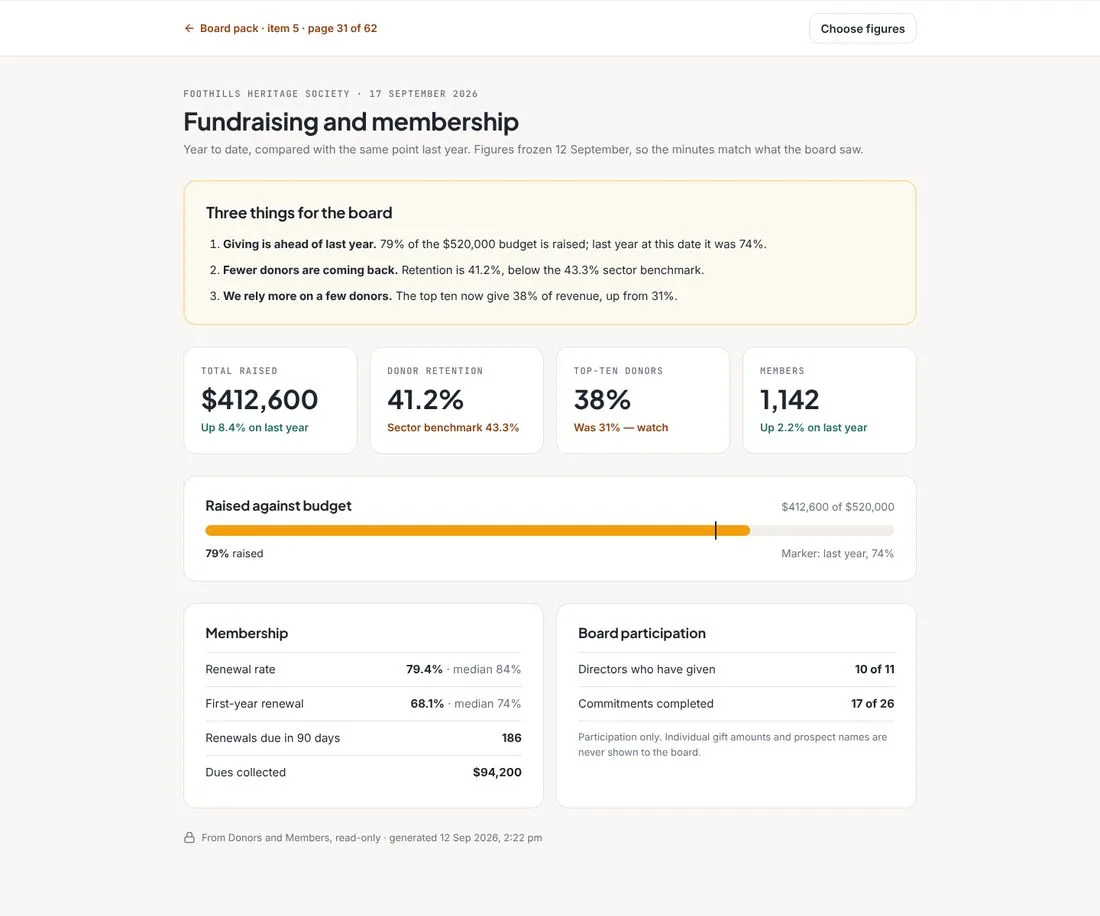
If you use 2Labs Donors and Members, Boards builds the fundraising and membership page for your pack automatically. Total raised against budget, donor retention, renewals and dues, with plain-English notes on what the numbers mean. The figures are frozen on the day you build the pack, so the minutes match what the board saw.
It shows participation and totals only. Individual gift amounts and prospect names are never shown to the board.
Three things for the board
Each page leads with the three things directors most need to notice, in plain words, followed by the numbers behind them.
Easy for directors, too.
Directors see what matters to them: the next meeting, whether they are coming, the pack, and their own short to-do list. They can reply to the meeting invitation with one tap, read the pack, keep private notes that only they can see, and sign their annual declaration of interest in about two minutes, with last year’s answers filled in.
Stuck? Just ask FRIDAY.
FRIDAY, our help assistant, is built into Boards from launch. Ask how to build a pack, record a motion or add a director, and get an answer from the Boards help articles with the sources shown. If FRIDAY can’t help, one click sends your question to a real person on the 2Labs team.
Questions about Boards
Who is Boards for?
Boards is for the boards and committees of Canadian not-for-profits, charities and member organizations, and for the one or two staff who look after them.
Does it work with Donors and Members?
Yes. If you use 2Labs Donors and Members, Boards builds a read-only fundraising and membership page for the board pack from them. It shows participation and totals only. Individual gift amounts and prospect names are never shown to the board.
Can staff or guests see private items?
No. Mark an agenda item as directors only and Boards removes it, its documents and its minutes from the copy that staff, guests and the auditor receive.
Can minutes be changed after they are approved?
No. Once the board approves minutes they are locked. Corrections go through the next meeting.
Is there help built in?
Yes. FRIDAY, the 2Labs help assistant, is built into Boards from launch. It answers from the Boards help articles, shows its sources, and passes your question to the 2Labs team when it can’t help.
Is Boards legal advice?
No. Boards helps you keep track of filings, terms, policies and deadlines, but it does not replace advice from your lawyer or your regulator.
When is Boards available?
Boards is coming soon. Book a conversation and we will tell you when it is ready.
Example screens use a fictional organization.
Want to be first to try Boards?
Tell us about your board. We will show you what Boards would take off your plate.