
A simple CRM for a small pipeline.
Sales is for the person or small team that sells to other businesses and has no sales operations behind them. Every deal has a next step, and what you say after a meeting files itself, ready for you to approve.
What Sales does.
Sales keeps your customers, contacts and deals in one place, and tells you each morning what needs you today. It is deliberately small, so a small team can run it without a CRM person.
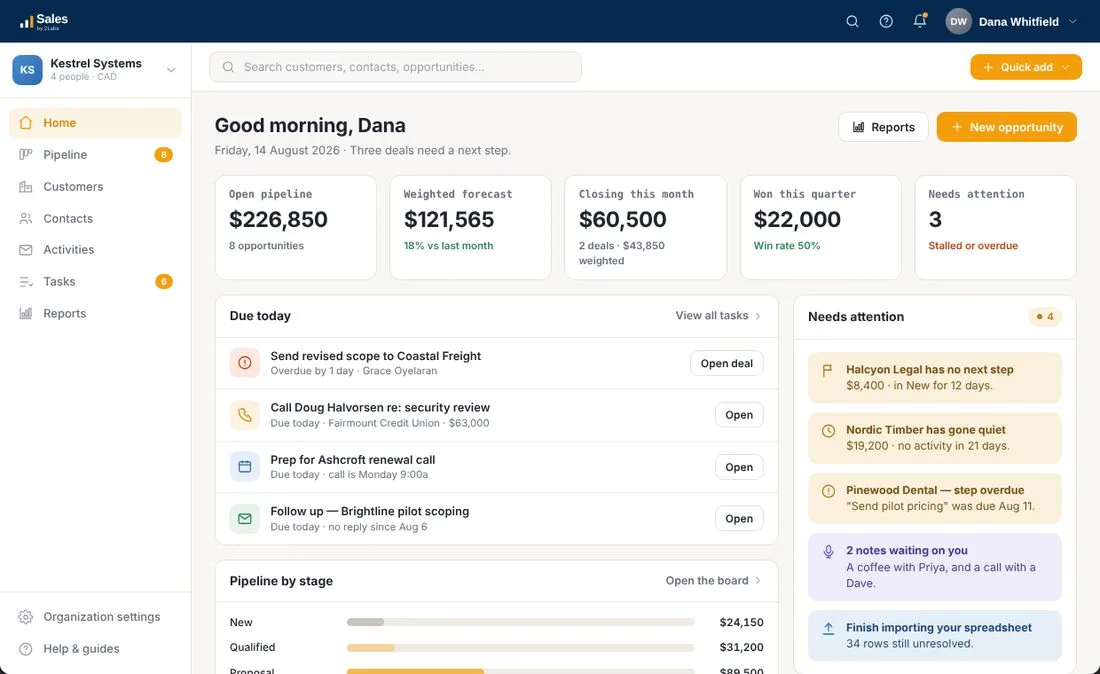
Start the day with what is next
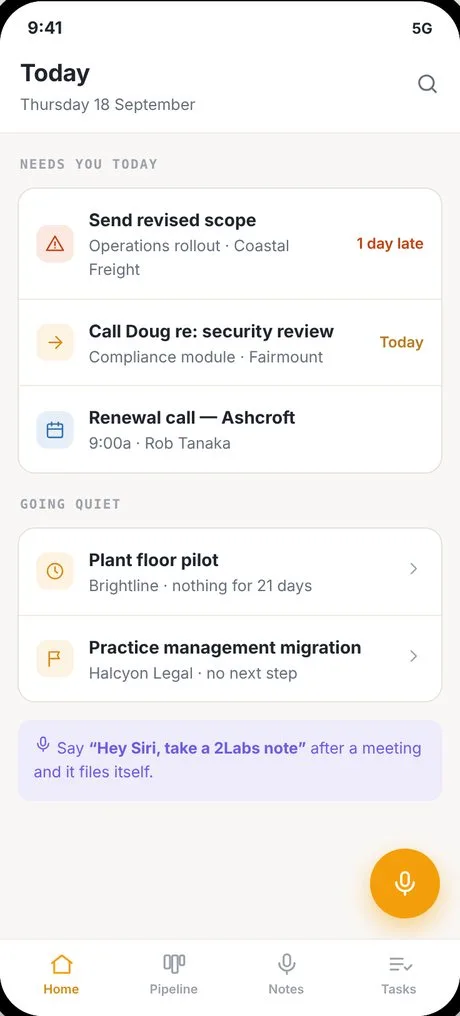
Home shows your open pipeline, the weighted forecast, what is closing this month and what you have won this quarter. Below that, a short list of what is due today, and a panel for deals that have gone quiet or have no next step.
Six steps, and every one of them leaves a record.
- 01
Add the opportunity
Name the deal, the customer, the value and when you expect it to close.
- 02
Set a next step
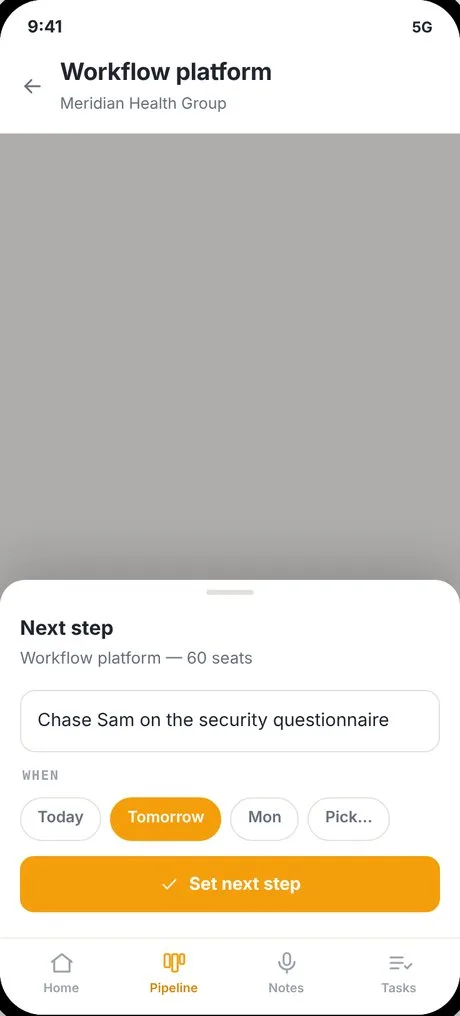
Every deal carries one next step with a date, so it is never just sitting there.
- 03
Say how likely it is
Pick from long shot to near certain, in plain words. The forecast does the maths.
- 04
Log what happened
Calls, emails, meetings and notes land on one timeline for the deal.
- 05
Move it along
Drag the deal to the next stage, or change it from the list.
- 06
Win it or lose it
Mark it won or lost, and say why. The reasons show up in your reports.
See the whole pipeline at once.
A board or a list
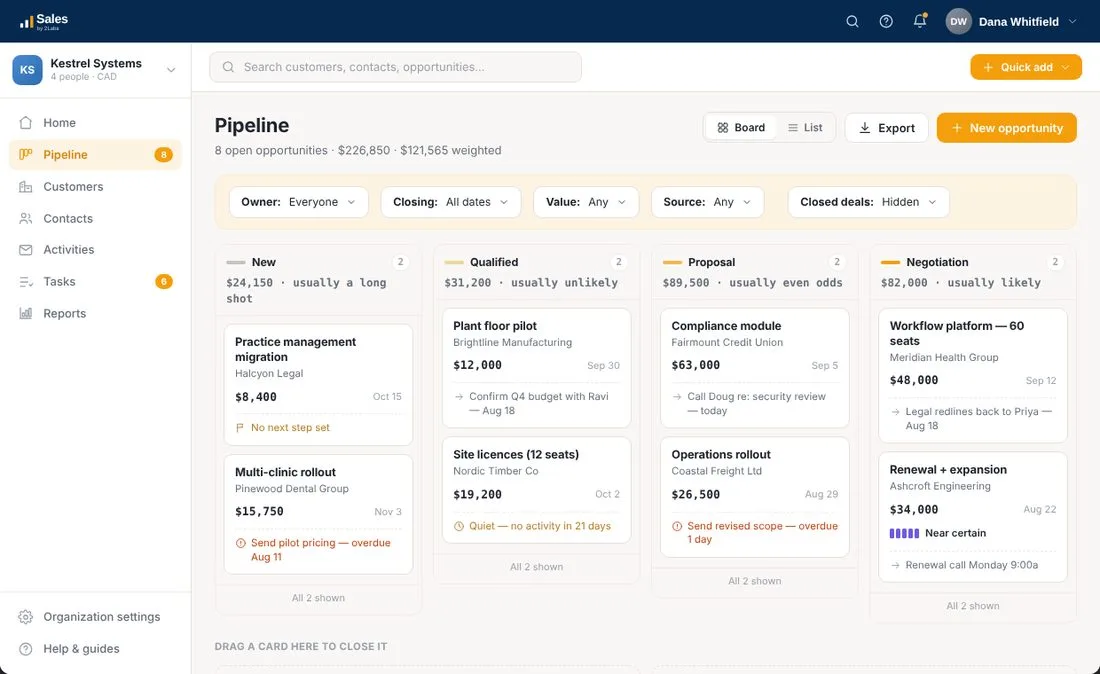
Stages run left to right, with the value of each stage and how likely deals in it usually are to close. Each card shows the customer, the value, the expected close date and the next step. A deal with no next step is flagged, so it can’t hide.
Prefer a list? Switch to it any time. Filter by owner, closing date, value or source.
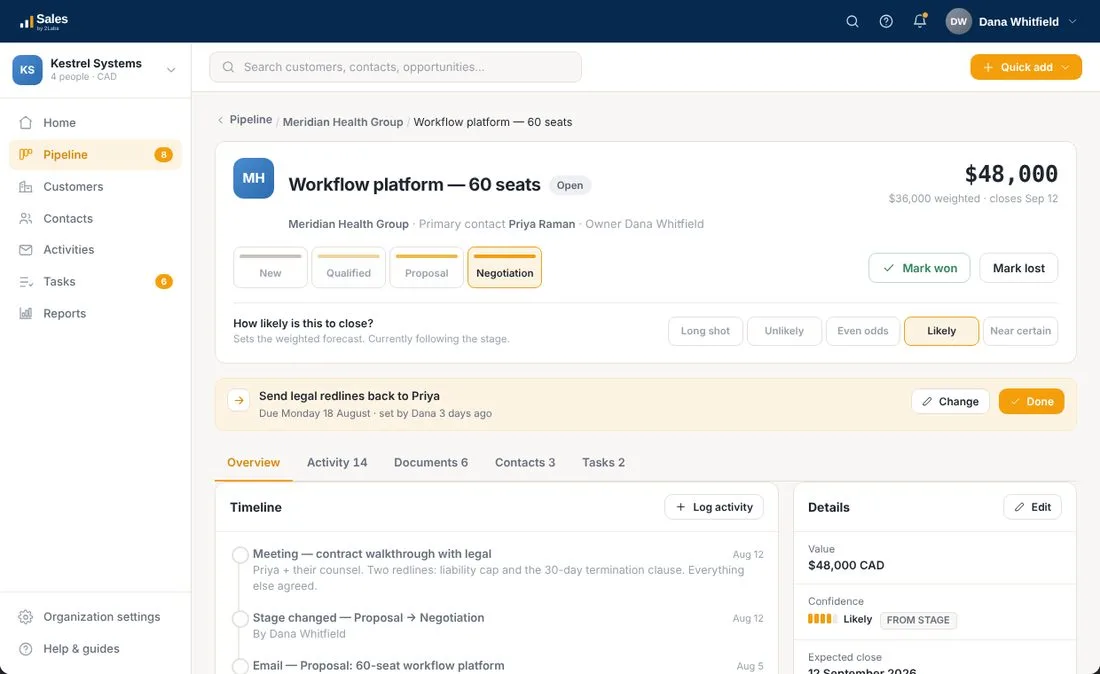
One page for each deal
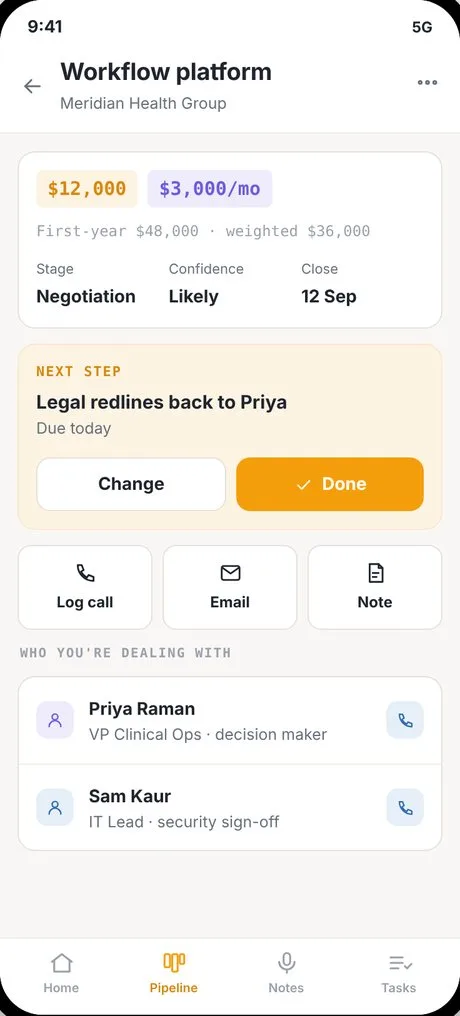
The deal page shows the stage, how likely it is, and the next step with a date. Below that sit the timeline, the details, the documents, the people involved and the tasks.
You choose how likely a deal is in plain words. Set it yourself and it sticks when the deal moves, so the stage never overwrites your judgment.
Say it out loud.
Talk, and it files itself
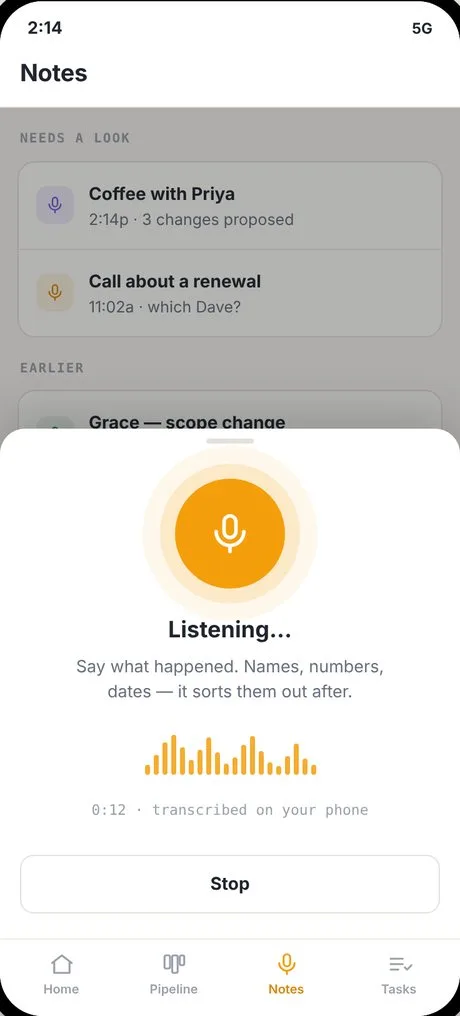
After a meeting, say “Hey Siri, take a 2Labs note” and tell it what happened. Siri summarizes it, and when you reach a bigger screen Sales has it ready to review: the meeting, the deal, the next step and the task. Names are matched to the people and companies you already have.
Every value carries a tag: heard if you said it, matched if it was tied to a record you already have, inferred if it was a reasonable guess. Check the guesses first.
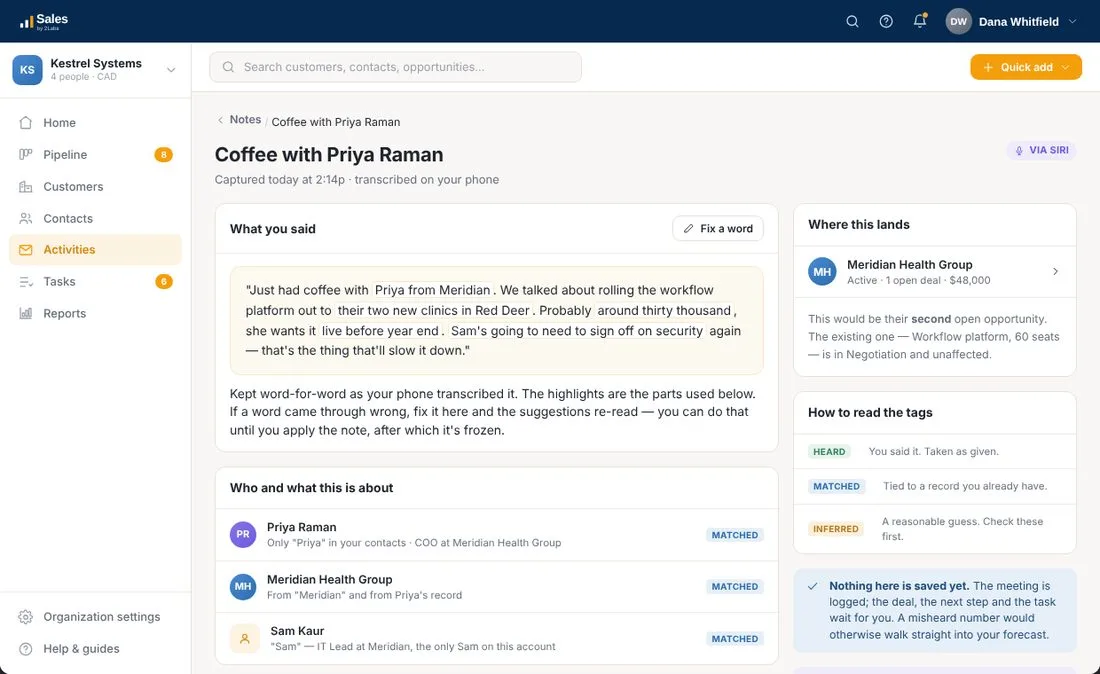
Nothing is saved until you say so.
The meeting is logged. The deal, the next step and the task wait for you. A misheard number never walks straight into your forecast.
The phone is for the ten minutes between meetings.
The phone does four jobs: capture what just happened, show what is next, let you look one thing up before you walk in, and move a deal on. The board, the reports, import and settings stay on the desktop, where they work properly.
Example screens use a fictional company.
Nothing slips through.
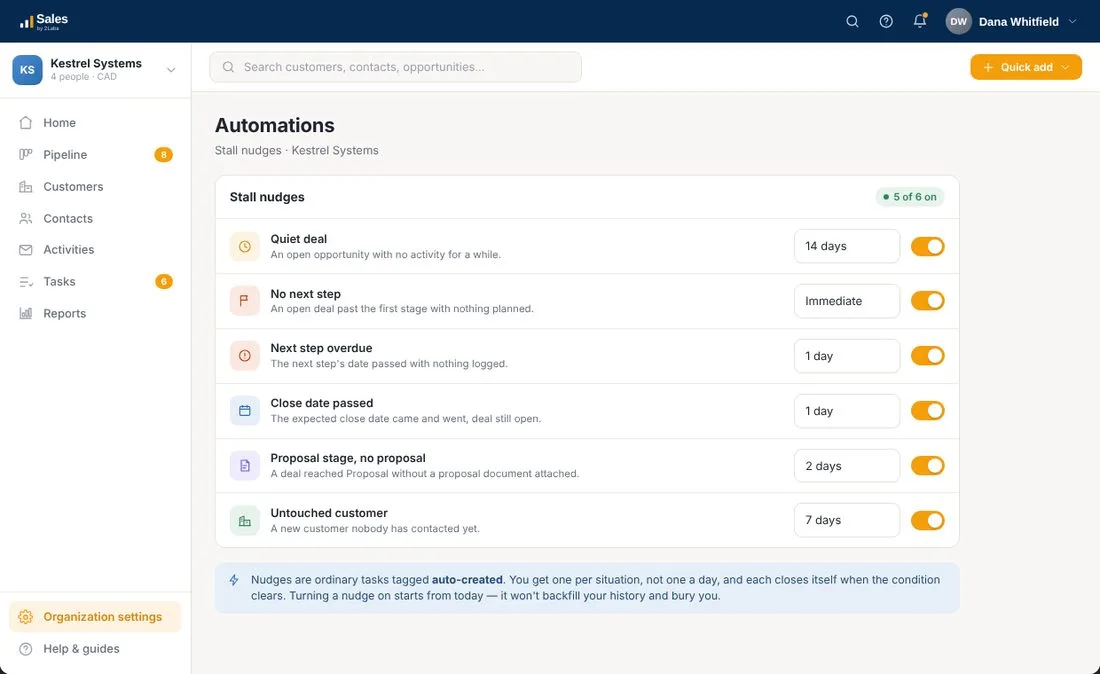
Gentle nudges, not nagging
Sales spots a deal with no next step, a next step that is overdue, a close date that has passed, or a deal that has gone quiet, and turns each into a task for you. You get one per situation, not one a day, and it closes itself when the problem is fixed.
You choose the number of days for each one, and you can switch any of them off.
Everyday jobs, handled.
Start from your spreadsheet
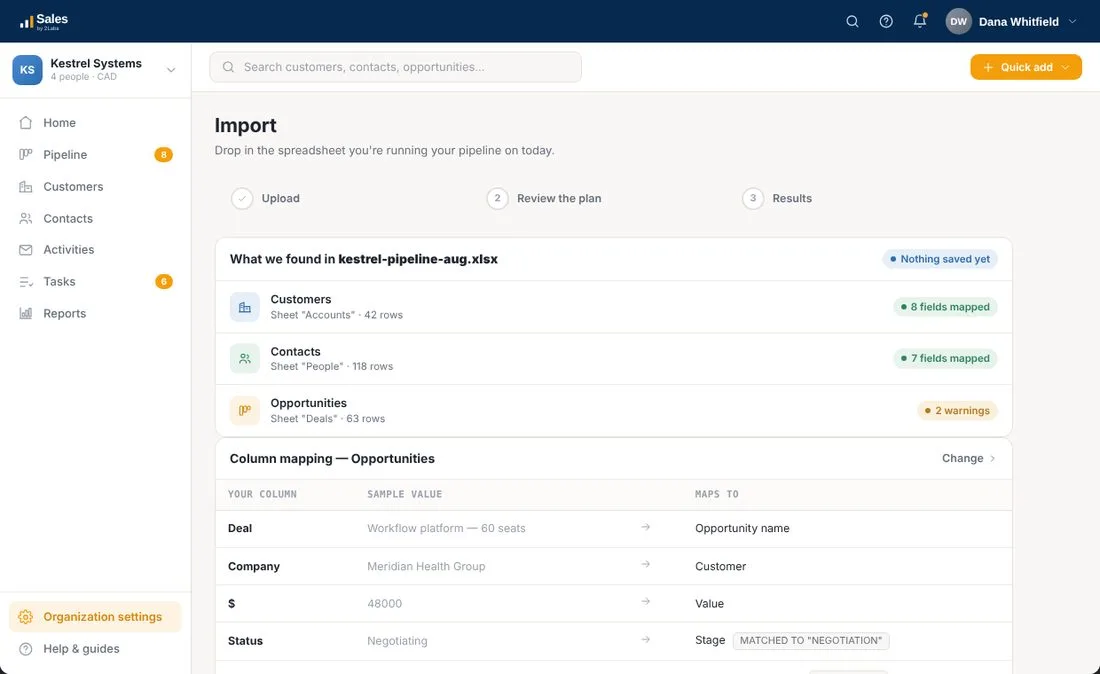
Drop in the spreadsheet you run your pipeline on today. Sales finds the customers, contacts and deals in it, matches your columns, and shows you a plan with any warnings, such as a stage it doesn’t recognise. Nothing is saved until you approve the import.
Five reports, on purpose
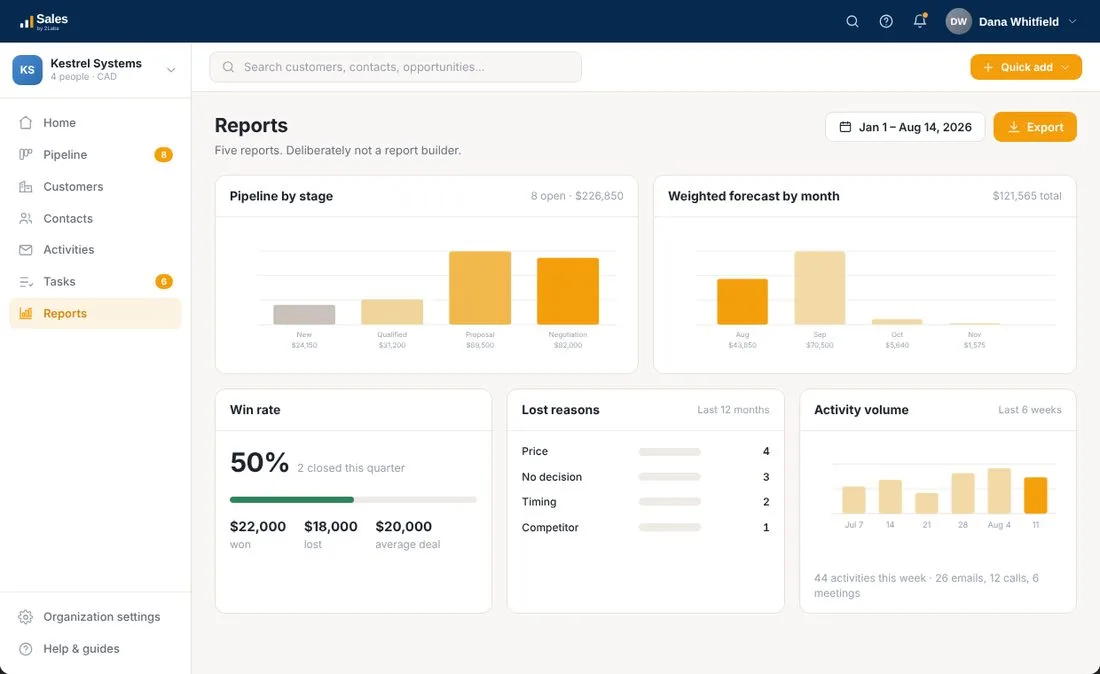
Pipeline by stage, weighted forecast by month, win rate, lost reasons and activity volume. It is deliberately not a report builder, so there is nothing to set up before you can read it.
Email the way people write
Starter templates for a first email, a follow-up, a proposal cover, a check-in and a polite close-out. Plain text with merge fields, no banners or buttons.
Contacts without a company
Met someone at a conference? Add them now, and link them to a company when you know it.
Your stages, your words
Rename the stages to fit how you sell. Won and Lost stay fixed so your reports stay honest.
Stuck? Just ask FRIDAY.
FRIDAY, our help assistant, is built into Sales. Ask how to set a next step, review a voice note or import your spreadsheet, and get an answer from the Sales help articles with the sources shown. If FRIDAY can’t help, one click sends your question to a real person on the 2Labs team.
$50 a month for up to 2,000 records. $150 a month for unlimited.
Unlimited users and every feature at both prices. No setup or migration fees. All prices in Canadian dollars.
Questions about Sales
Who is Sales for?
Sales is for a person or a small team that sells to other businesses and has no sales operations behind them. It keeps a small pipeline in one place so nothing depends on memory or a spreadsheet.
What makes it different from a bigger CRM?
It does a few things and leaves the rest out. Every deal has a next step, the pipeline is a board or a list, and there are five plain reports. There is no report builder, no marketing automation and no pages of settings to learn.
What does ‘say it out loud’ mean?
After a meeting, say “Hey Siri, take a 2Labs note” and tell it what happened, or press the mic in the app, or type it. Siri summarizes it, and when you get to a bigger screen Sales has it ready for you to review. It suggests the meeting to log, the deal to create, the next step and the task. Each suggestion is tagged heard, matched or inferred, and nothing is saved until you accept it.
Can it get a deal or a person wrong?
It can guess. That’s why each value is tagged by where it came from, and why nothing is saved until you approve it. A misheard number never goes straight into your forecast.
What if I have no signal?
Notes you capture on the phone are kept on the phone and sent on their own when you have signal again. You can keep capturing in the meantime.
How does the forecast work?
You pick how likely a deal is in plain words, from long shot to near certain. Each stage has a default, and if you set it yourself it sticks when the deal moves. The forecast turns those words into a weighted number for you.
Can I bring my spreadsheet?
Yes. You upload it, Sales finds the customers, contacts and deals in it, matches your columns, and shows you a plan with any warnings. Nothing is saved until you approve the import.
Does it send marketing email?
No. Sales email is plain text with merge fields, the way a person writes to another person. Starter templates ship with the product for a first email, a follow-up, a proposal cover, a check-in and a polite close-out.
Is there help built in?
Yes. FRIDAY, the 2Labs help assistant, is built into Sales. It answers from the Sales help articles, shows its sources, and passes your question to the 2Labs team when it can’t help.
Where is my data kept?
Your data is hosted in Microsoft Azure Canadian regions.
What does it cost?
$50 a month for up to 2,000 records, or $150 a month for unlimited records. Unlimited users and every feature at both prices. No setup or migration fees. All prices are in Canadian dollars.
Example screens use a fictional company.
Want to be first to try Sales?
Tell us you’re interested and we’ll let you know when it opens.