
Join, belong, renew, so nothing lapses silently.
Members is membership management for Canadian associations, clubs, chambers and congregations. Renewals run themselves, members look after their own details, and your board gets the numbers without anyone copying them into a slide.
What Members does.
Members keeps every membership, renewal, invoice and event in one place and does the chasing for you. It is built for Canada, with GST/HST on dues, the CRA advantage rule for charities, and your data hosted in Canada.
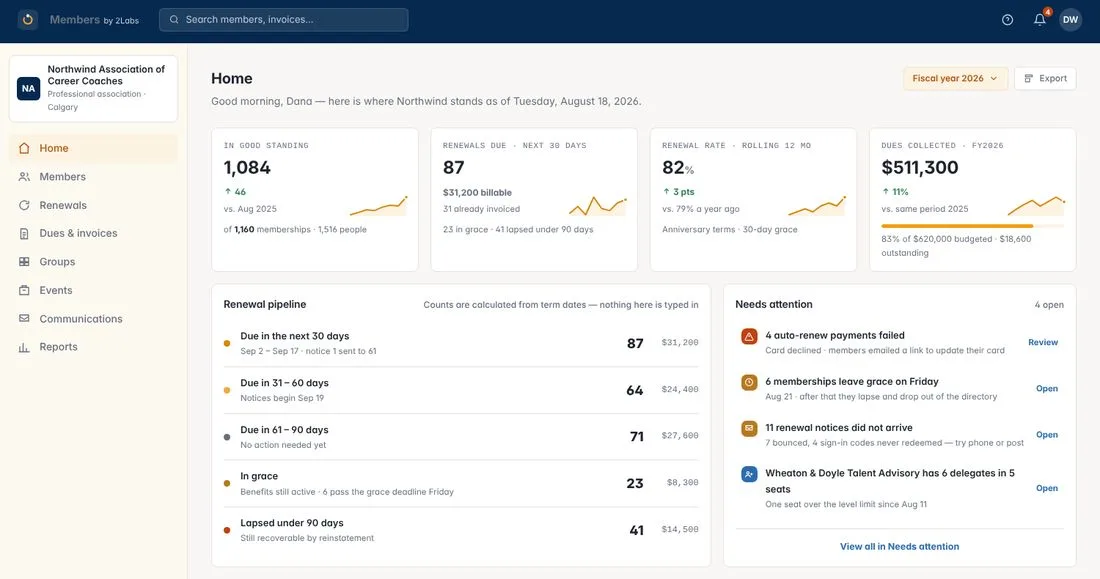
See every renewal coming
Renewals are calculated from term dates, so nothing is typed in. You can see who is due in the next 30, 60 and 90 days, who is in grace and who has lapsed but could still be reinstated. A short list shows what needs you, such as a failed auto-renew payment or a notice that never arrived.
Six steps, and Members keeps each one tied to the next.
- 01
Join
Members join through a form on your own site, and their record and level are created for them.
- 02
Belong
A wallet card, a directory listing they control, events and their own receipts, all in one portal.
- 03
Get reminded
Renewal notices go out on a schedule you can see, and stop the moment a member pays.
- 04
Renew
Members renew themselves in about three minutes, or you renew on their behalf.
- 05
Recover
Grace period, then lapsed, then reinstated. Nobody drops off a list unnoticed.
- 06
Report
Totals for your board, treasurer and auditor, read live from the same records.
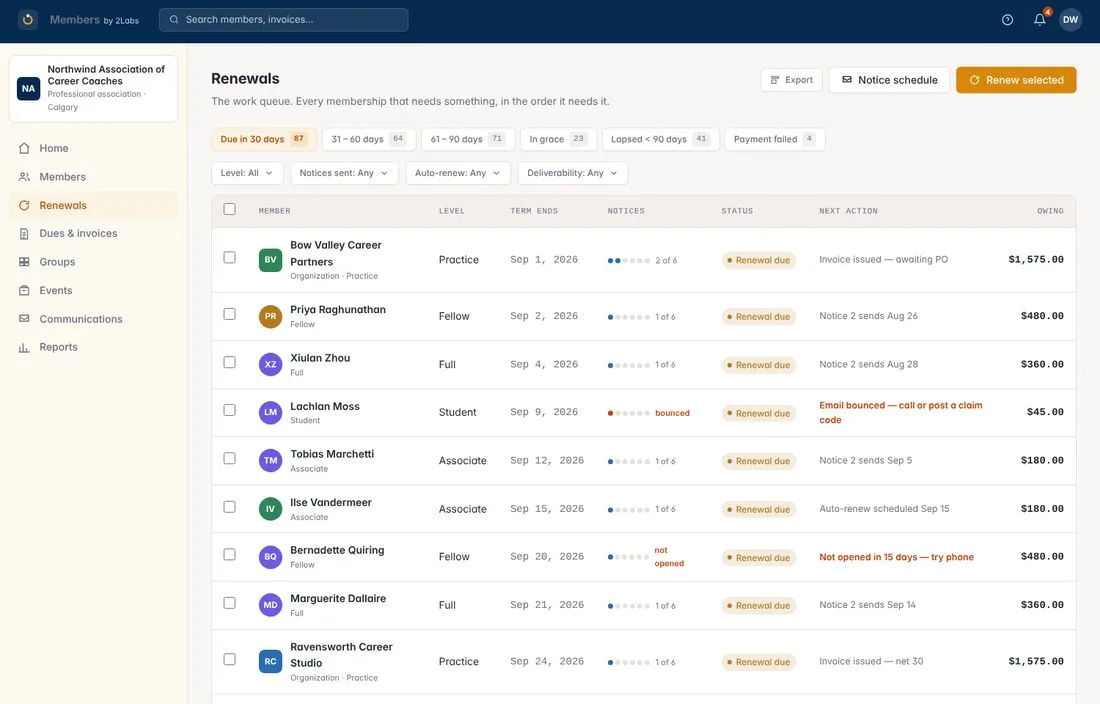
A renewal queue that does the chasing.
Every membership that needs something, in order
The renewals screen is a work queue. Each row shows the member, their level, when the term ends, how many notices they’ve had, and what happens next. If an email bounces or a notice is never opened, Members tells you to try the phone or post a claim code instead.
A notice sequence stops the moment the member pays, so nobody gets a reminder for something they have already done.
Members renew themselves.
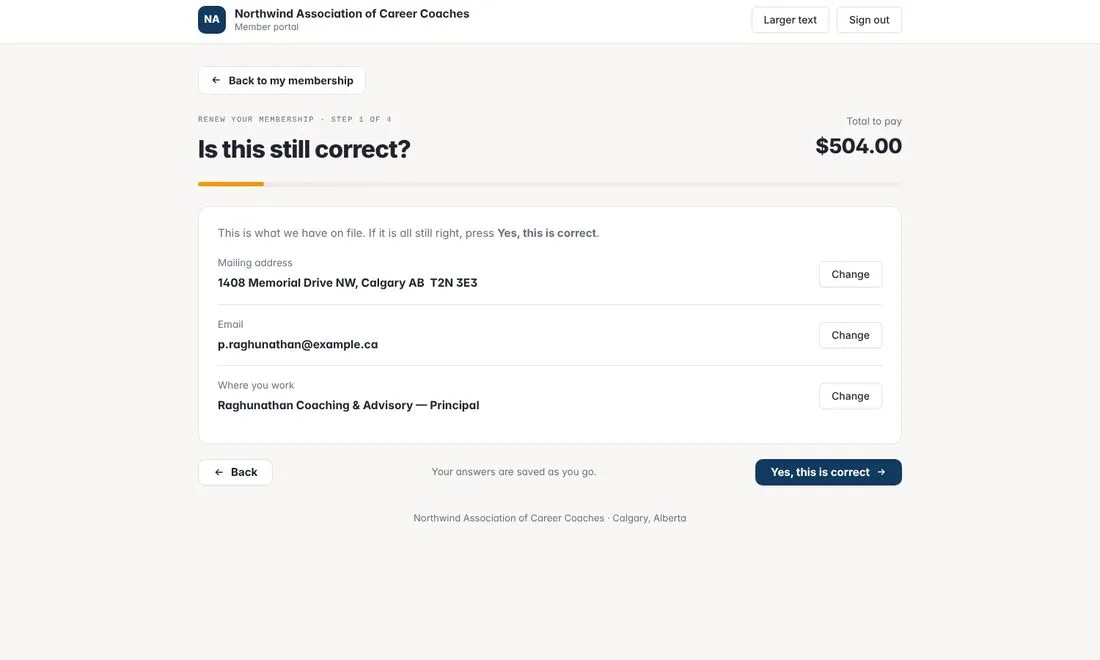
Four steps, about three minutes
Members sign in with a one-time code sent to their email. They confirm the details on file, answer your renewal questions, agree and pay. Their answers are saved as they go.
The portal also lets members update their details, download receipts, sign up for events and show their membership card. A larger-text option is one click away.
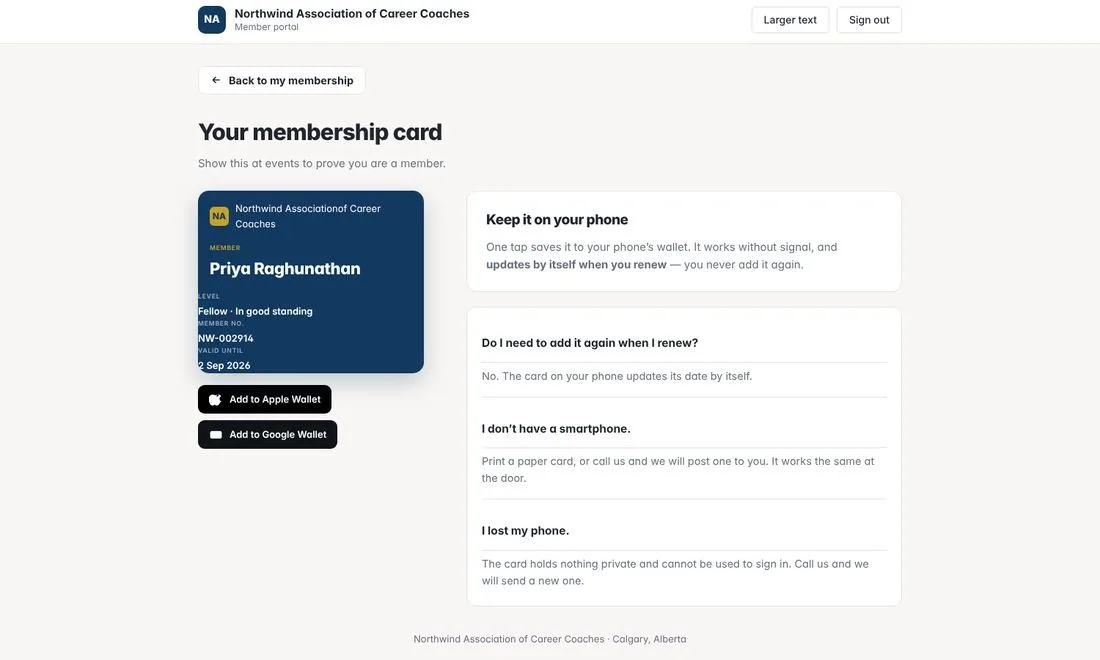
A membership card that stays current
Members add their card to Apple Wallet or Google Wallet in one tap. It works without a signal and updates its own date when they renew, so they never add it again. No smartphone? They can print a paper card, or you can post one.
Everything a membership office needs.
Households and organizations
One record can be a person, a household or an organization with delegates, so the right people get the right access.
Duplicates, merged safely
Merge two records into one. Terms, invoices, payments and history move across, and nothing is deleted.
Levels you control
Set the price, term, tax treatment and who each level is for. Changing a price never re-prices a term already started.
A directory members control
Members choose what appears about them, and you choose whether the directory is public or members-only.
Forms that run the membership
Join, renew and manage-membership forms are built in, and you can embed any form on your own site.
Dues and invoices in one place
What was billed, what was collected and what is overdue, with GST/HST calculated from the level.
Cards and events that work at the door.
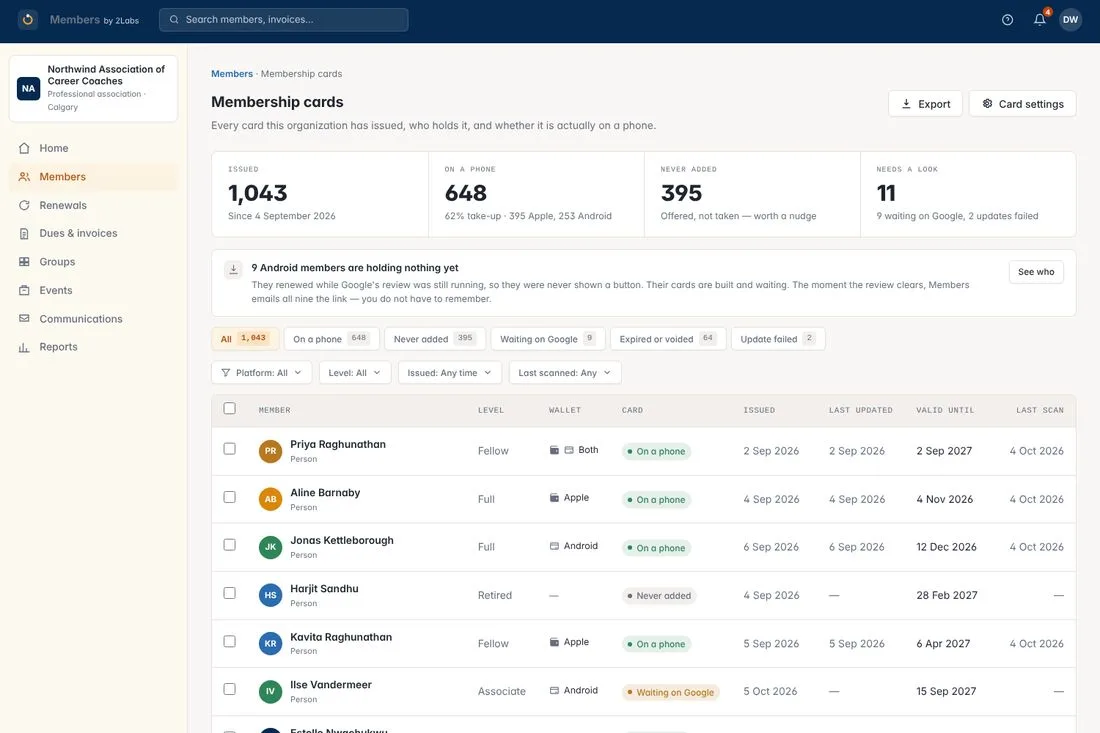
Know who has their card
See every card you have issued and who is actually carrying it, with a nudge list for the ones never added. For events, check-in is a stripped-down screen for the person at the door. It works offline, shows whether the member is in good standing right now, and posts continuing-education credits when someone is checked in, not when they register.
Lapsed members can still check in on the ticket they bought, and Members raises a task for your office. Walk-ups can buy a ticket at their correct level price, on the spot.
GST/HST and the CRA advantage rule, handled.
Set the tax treatment once on each membership level and it applies to every invoice. If you are a registered charity, Members records the advantage, meaning the value of what the member receives, and issues the receipt for the payment minus that advantage. If you are not a charity, receipting stays off and members get an invoice showing the dues and the GST.
Your data is hosted in Canada. This is a setting, not tax advice, so confirm your treatment with your advisor.
Numbers your board can read.
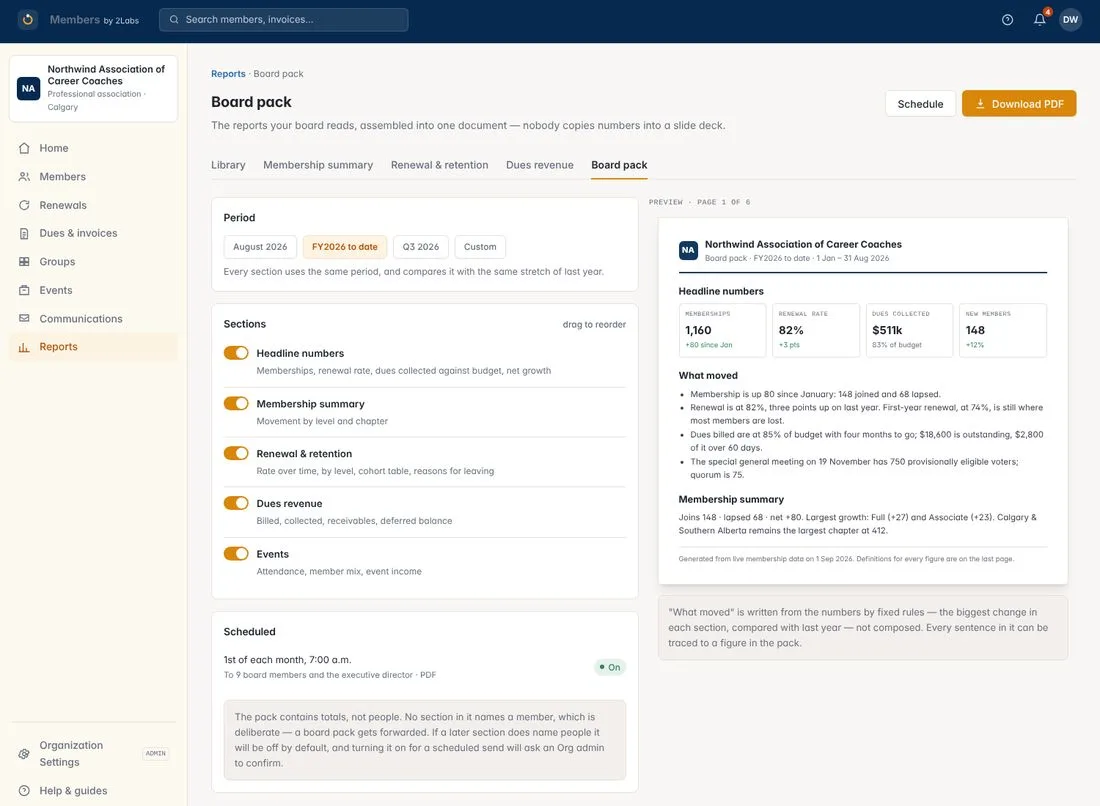
A board pack that assembles itself
Membership summary, renewal and retention, and dues revenue come together in one PDF with a cover and your commentary. Choose the period, choose the sections, and schedule it to go out each month. Nobody copies numbers into a slide deck.
The pack contains totals, not people. No section names a member, because a board pack gets forwarded.
Stuck? Just ask FRIDAY.
FRIDAY, our help assistant, is built into Members from launch. Ask how to send renewal notices, merge two records or set up a level, and get an answer from the Members help articles with the sources shown. If FRIDAY can’t help, one click sends your question to a real person on the 2Labs team.
$50 a month for up to 2,000 members. $150 a month above that.
Unlimited users and every feature at both prices. No setup or migration fees. All prices in Canadian dollars.
Questions about Members
What kinds of membership does it handle?
One record covers individual, household, organizational and life memberships. An organizational level can include a set number of seats, with extra seats priced separately.
What happens when a member doesn’t renew?
Renewal notices go out on a schedule and stop the moment the member pays. If they miss the date, their benefits carry on through a grace period you set. After that they lapse, but you can reinstate them. If an email bounces, Members tells you to call or post a claim code instead.
Can members renew themselves?
Yes. Members sign in to the member portal with a one-time code, confirm their details, answer your questions, agree and pay. It takes about three minutes, and there are no passwords to forget.
Does it handle GST/HST on dues?
Yes. Tax treatment is set once on each membership level and applied to every invoice. For registered charities, Members also models the CRA advantage rule. Most US-built tools don’t attempt it. This is a setting, not tax advice, so confirm your treatment with your advisor.
What if a member doesn’t have a smartphone?
They can print a paper card or ask you to post one. It works the same at the door.
Does check-in work without a signal?
Yes. The door person’s screen verifies the member’s wallet card on the device itself, so check-in works offline. Good standing is read from the member record at the moment of the scan.
Is there help built in?
Yes. FRIDAY, the 2Labs help assistant, is built into Members from launch. It answers from the Members help articles, shows its sources, and passes your question to the 2Labs team when it can’t help.
What does it cost?
$50 a month for up to 2,000 members and $150 a month above that. Unlimited users and every feature are included at both prices.
When is Members available?
Members is coming soon. Register your interest and we’ll tell you when it’s ready. We won’t run a sales sequence in the meantime.
Example screens use a fictional association.
Want to be first in line?
We’ll tell you when Members is ready. No sales sequence in the meantime.